> For the complete documentation index, see [llms.txt](https://docs.layerlens.ai/llms.txt). Markdown versions of documentation pages are available by appending `.md` to page URLs; this page is available as [Markdown](https://docs.layerlens.ai/7.-observe-see-whats-happening/synthetic-data.md).

# Synthetic data

{% hint style="info" %}
**Available in Stratix Premium.** This surface is part of the logged-in workspace at [stratix.layerlens.ai](https://stratix.layerlens.ai). Stratix Public users can browse the catalog but cannot use this feature.
{% endhint %}

Synthetic data generation *creates* realistic agent traces so you can build evaluation datasets without waiting to collect production traffic. Use it to:

* **Bootstrap** — get a full dataset when you have no traces yet
* **Expand / vary** — turn a handful of real traces into a larger, more diverse set
* **Build golden datasets** — domain-specific traces for testing judges, scorers, and evaluations

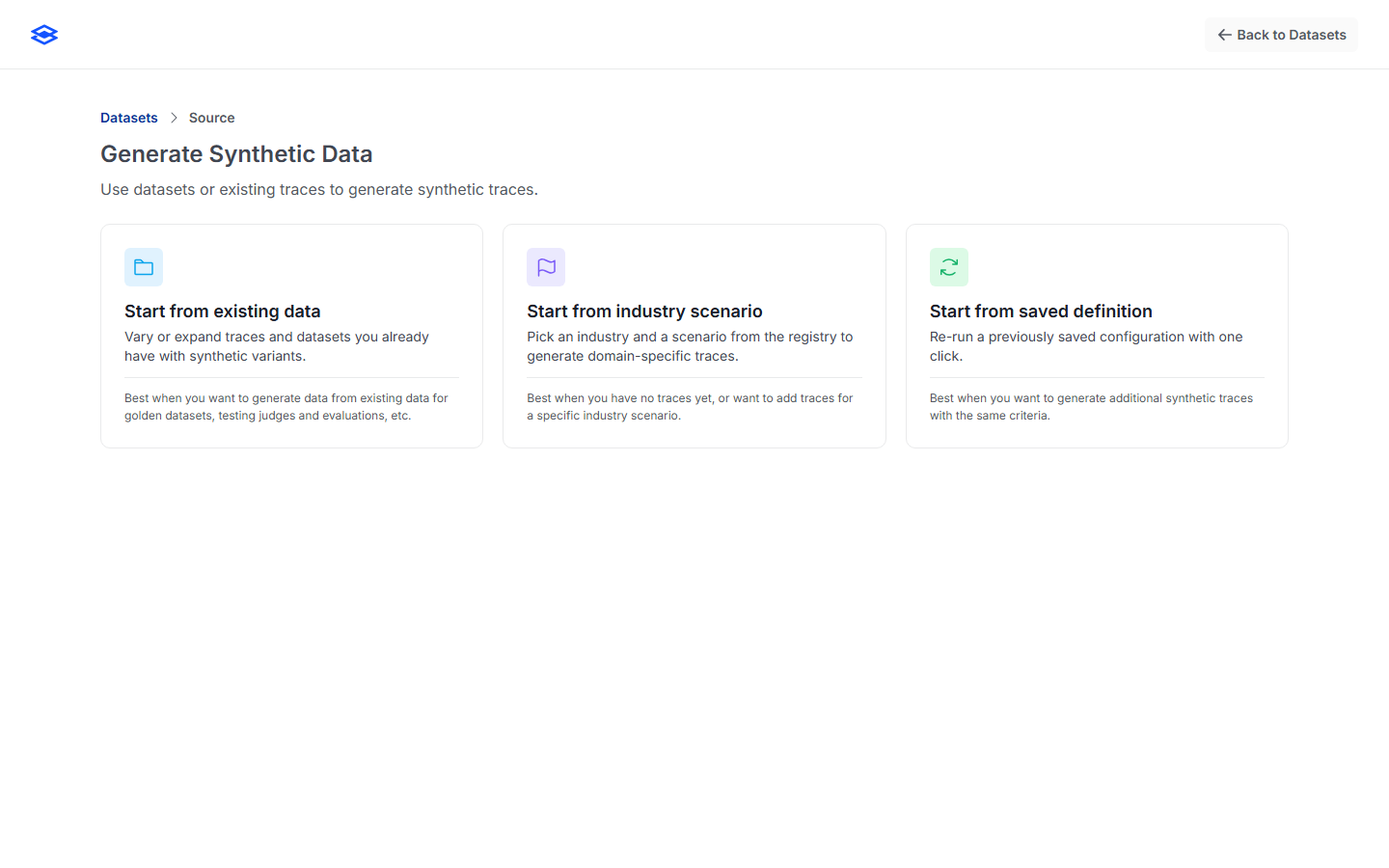
Start from **Catalog → Datasets → New Dataset → Generate synthetic traces**. The wizard is a two-step flow: **pick a source**, then **configure & generate**.

<figure><img src="/files/6ii2TJB1A9m9tOCaYSM4" alt="The synthetic source picker with three cards: start from existing data, industry scenario, or saved definition"><figcaption><p>Step 1 — choose where the synthetic data is seeded from.</p></figcaption></figure>

## Step 1 — Choose a source

### Start from existing data

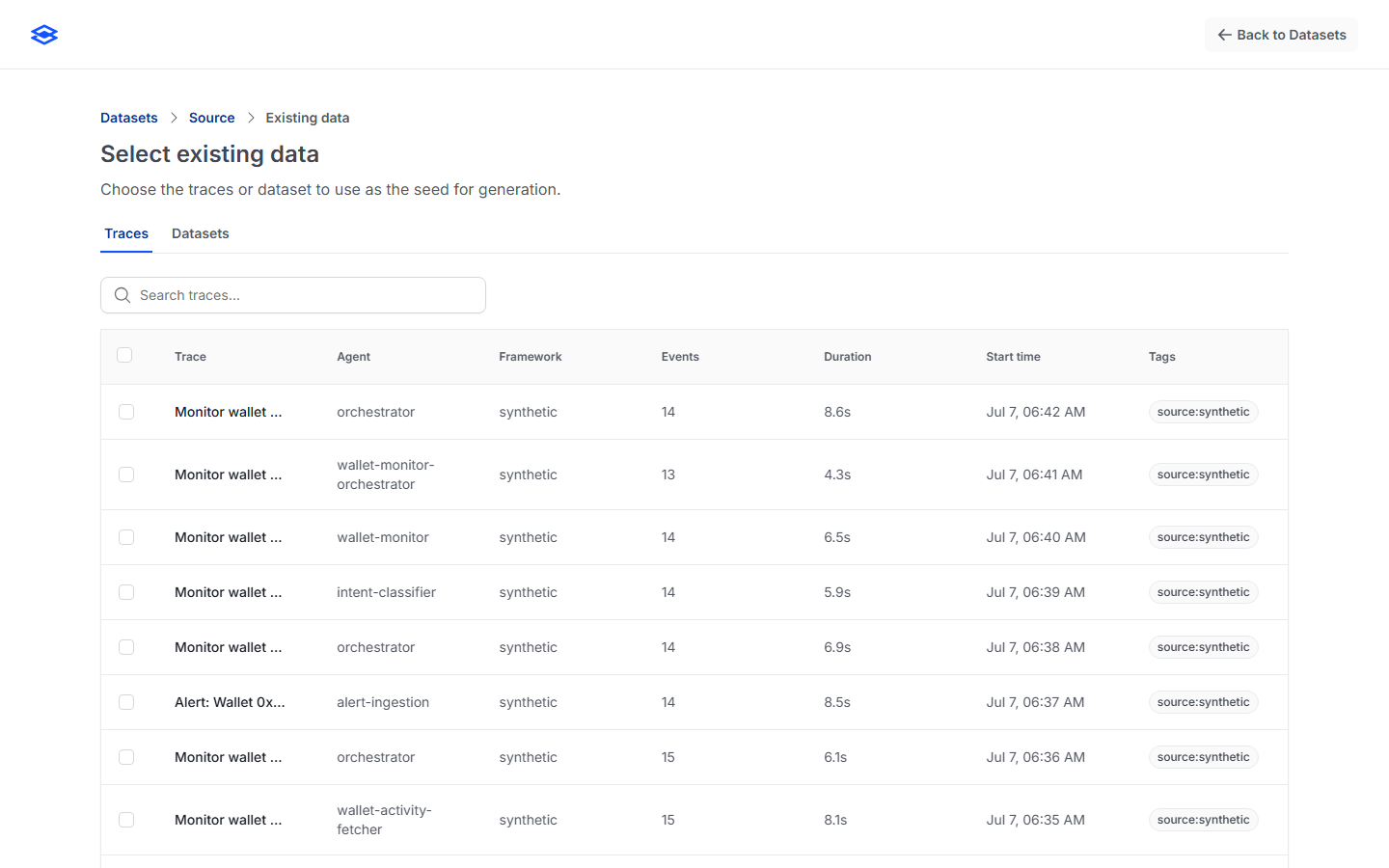
Vary or expand traces and datasets you already have. Pick individual **traces** or a whole **dataset** as the seed; the generator produces synthetic variants that preserve intent while adding diversity. Best for golden datasets and for growing a small real set.

<figure><img src="/files/IcCe6VNjAYC1Mcc7TMte" alt="Selecting existing traces or a dataset as the generation seed"><figcaption><p>Seed from existing traces or a dataset.</p></figcaption></figure>

### Start from industry scenario

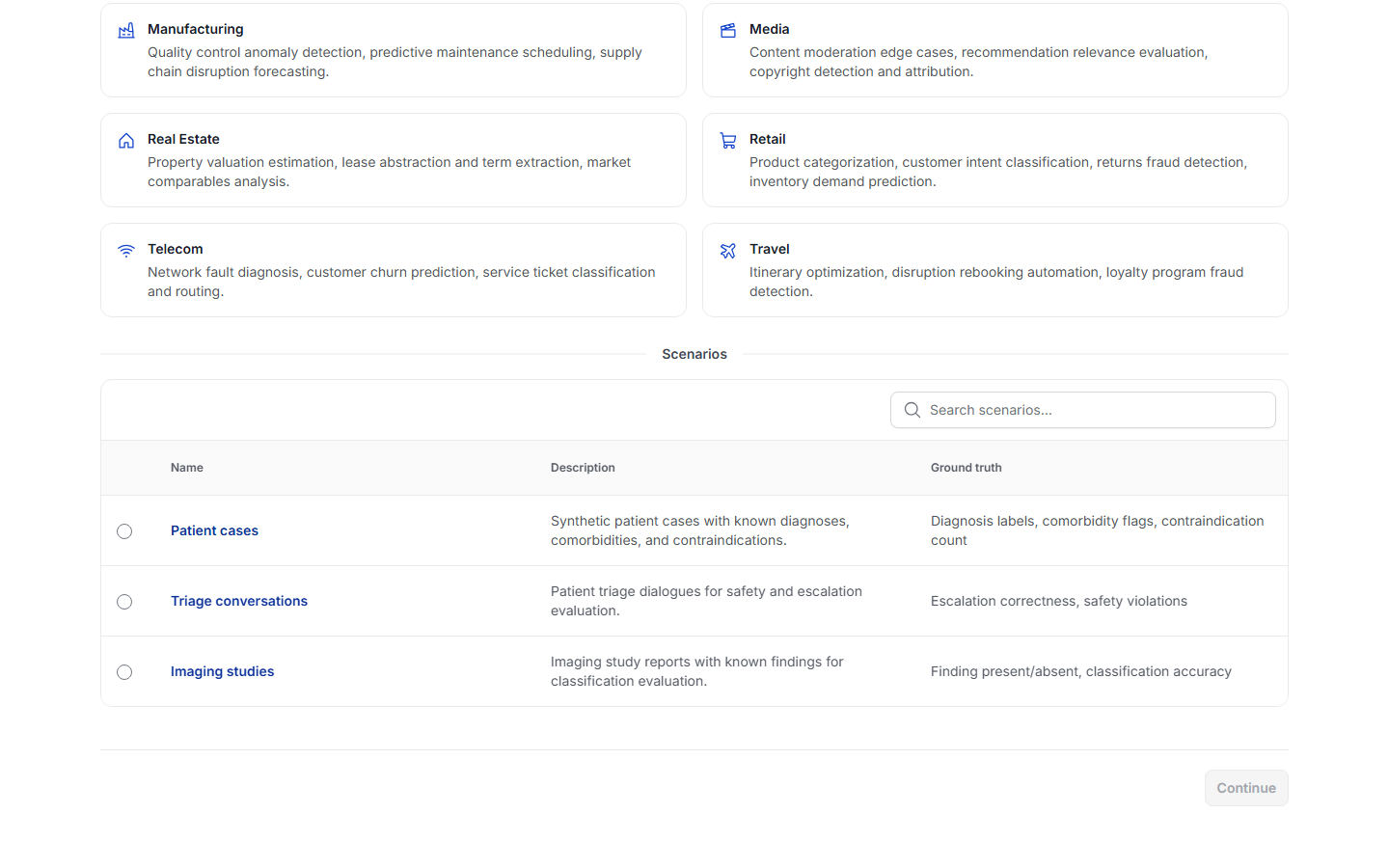
Pick an industry and a scenario from the built-in registry to generate domain-specific traces — **14 industries** (healthcare, financial services, legal, insurance, retail, media, manufacturing, energy, real estate, travel, government, education, telecom, crypto) spanning **30 scenarios**. Best when you have no traces yet or want coverage for a specific domain.

<figure><img src="/files/1vb33QFVxqOwPoP2WNaQ" alt="Choosing an industry and one of its scenarios"><figcaption><p>Pick an industry, then a scenario, each with a description and ground truth.</p></figcaption></figure>

### Start from saved definition

Re-run a previously saved generation **definition** with one click. A definition captures the source, shaping prompt, quality, count, and destination so a run is reproducible. (This card is disabled until you've saved at least one definition — see [Save as a reusable definition](#save-as-a-reusable-definition).)

## Step 2 — Configure & Generate

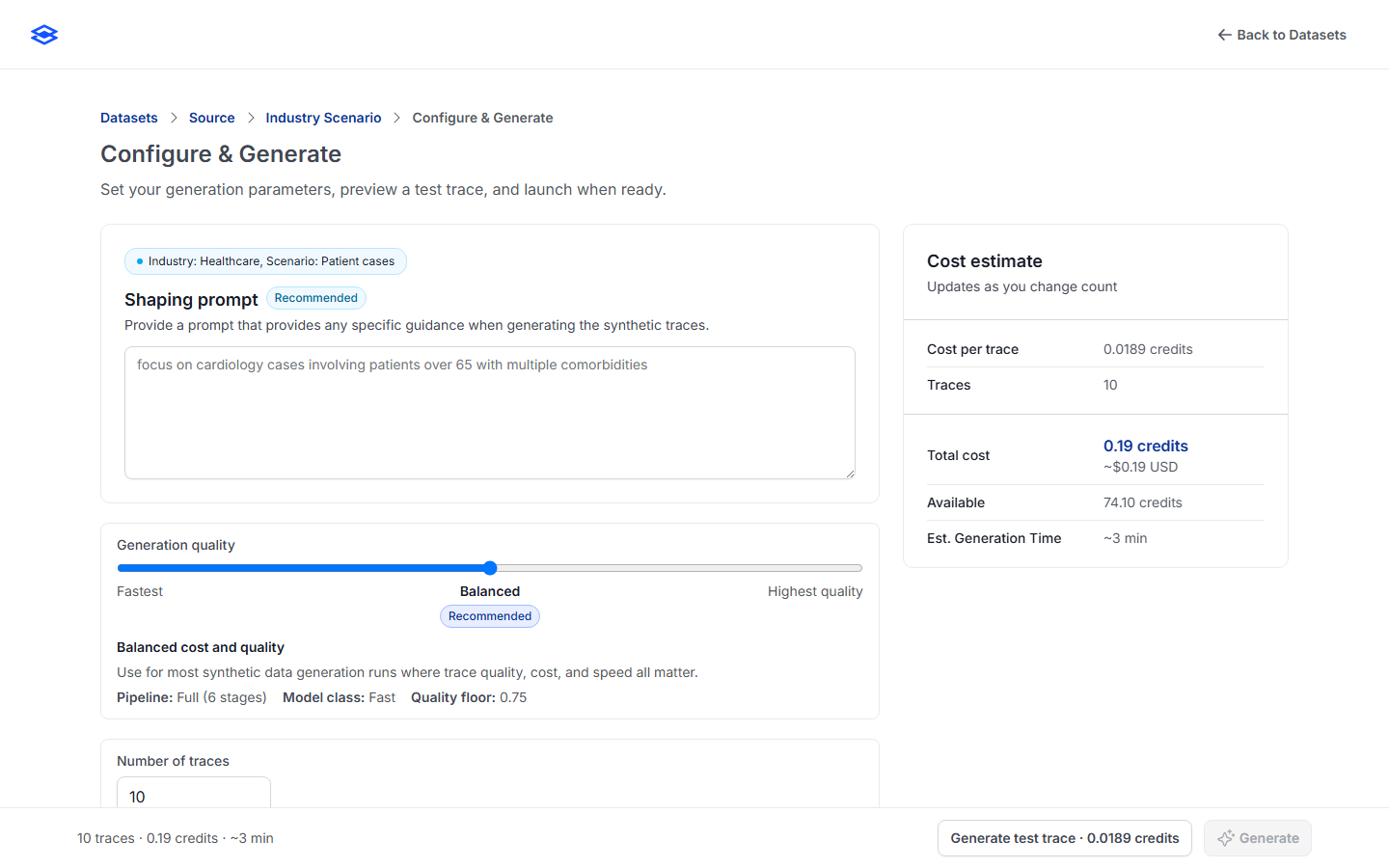
<figure><img src="/files/kuT2ET3kNUW8CpMOwjP7" alt="The Configure and Generate step: shaping prompt, generation quality, number of traces, and the live cost estimate"><figcaption><p>Configure the run and preview cost before generating.</p></figcaption></figure>

* **Shaping prompt** *(recommended)* — free-text guidance that steers the run (e.g. *"focus on cardiology cases involving patients over 65 with multiple comorbidities"*). Up to 10,000 characters.
* **Generation quality** — a three-stop slider (see the table below).
* **Number of traces** — 1–10,000, with quick presets (1, 10, 25, 50, 75, 100, 1,000). Default 10.
* **Destination** — where the results land:
  * **Create new dataset** — a new dataset (name required).
  * **Append to existing dataset** — add to a dataset (schema must match).
  * **Keep as traces** — store loose in the Traces list, no dataset.
* **Cost estimate** — a live panel showing cost per trace, total credits (and \~USD), available credits, and estimated generation time; it updates as you change the count and warns before an expensive run.

### Generation quality tiers

| Tier                         | Model class           | Quality floor | Use it for                                                                     |
| ---------------------------- | --------------------- | ------------- | ------------------------------------------------------------------------------ |
| **Fastest**                  | Fast (haiku-class)    | 0.60          | High-volume runs where volume matters more than per-trace nuance; lowest cost. |
| **Balanced** *(recommended)* | Fast (sonnet-class)   | 0.75          | Most runs — quality, cost, and speed all matter. The default.                  |
| **Highest quality**          | Frontier (opus-class) | 0.85          | Production-grade datasets and sensitive evaluations where precision leads.     |

Cost scales with the tier (roughly 5× from Fastest to Highest per trace); the cost panel always shows the exact estimate before you commit.

### Preview a test trace

Before launching the full run, click **Generate test trace** to produce a single preview scored on a four-part rubric — **correctness, coverage, plausibility, safety** (0–1 each) — so you can sanity-check quality and shaping before spending credits on the whole batch.

### Save as a reusable definition

Toggle **Save as reusable definition**, give it a name, and the run's configuration is saved. It then appears under **Start from saved definition** for one-click reruns.

## Generating

Clicking **Generate** enqueues an asynchronous job and opens a live progress screen (traces generated, credits consumed, estimated time remaining). Generation runs server-side — you can navigate away or close the page; Stratix emails you when it finishes.

* **Cancel generation** stops the run and preserves everything generated so far; the dataset is marked **partial**.
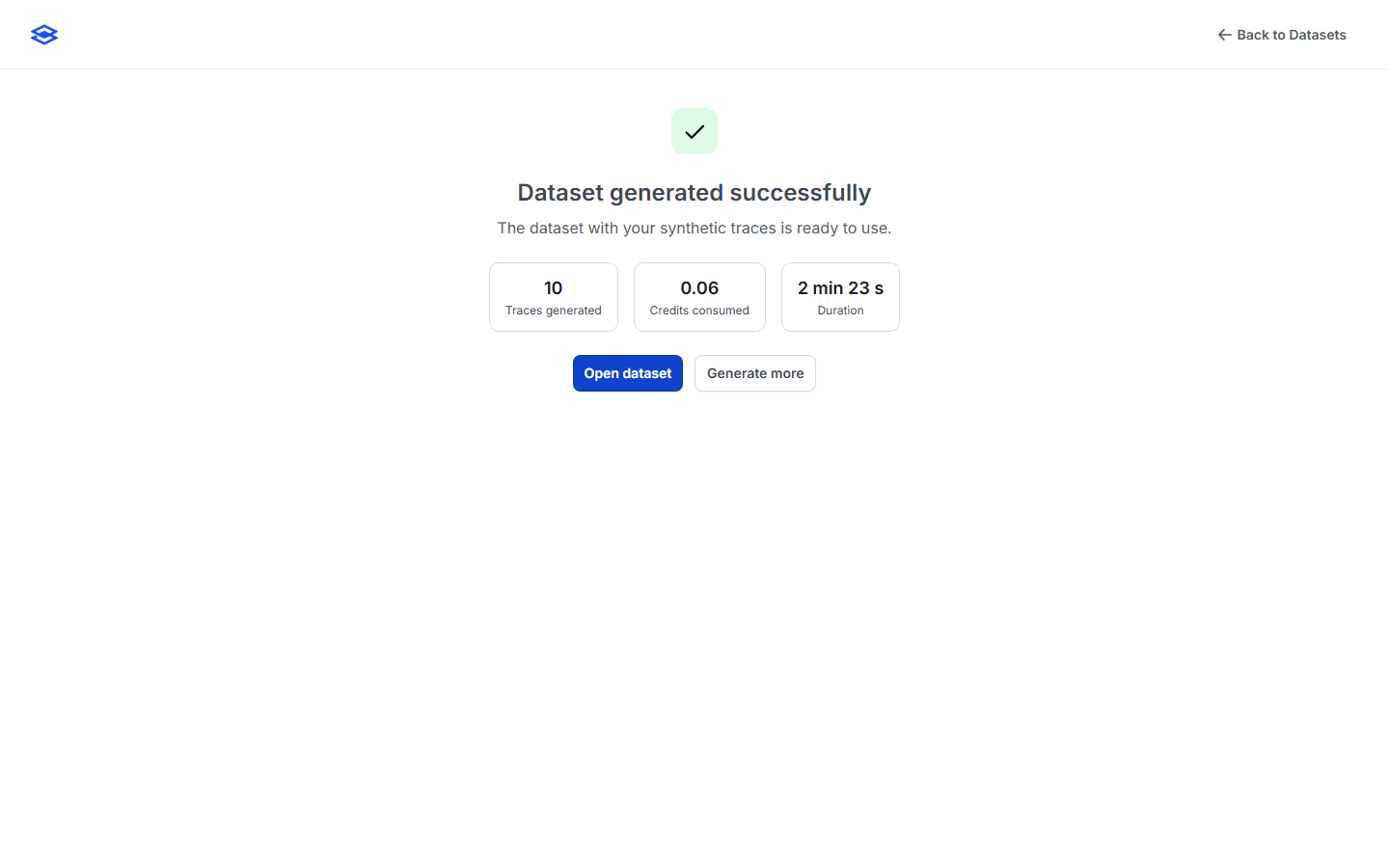
* On completion you land on a terminal screen: **Open dataset** (or **View traces** for a keep-as-traces run), or **Generate more**.

<figure><img src="/files/lf7HaiHGeMIlvjXWvr55" alt="A completed synthetic generation job showing traces generated, credits consumed, and duration"><figcaption><p>A finished generation job.</p></figcaption></figure>

## What you get

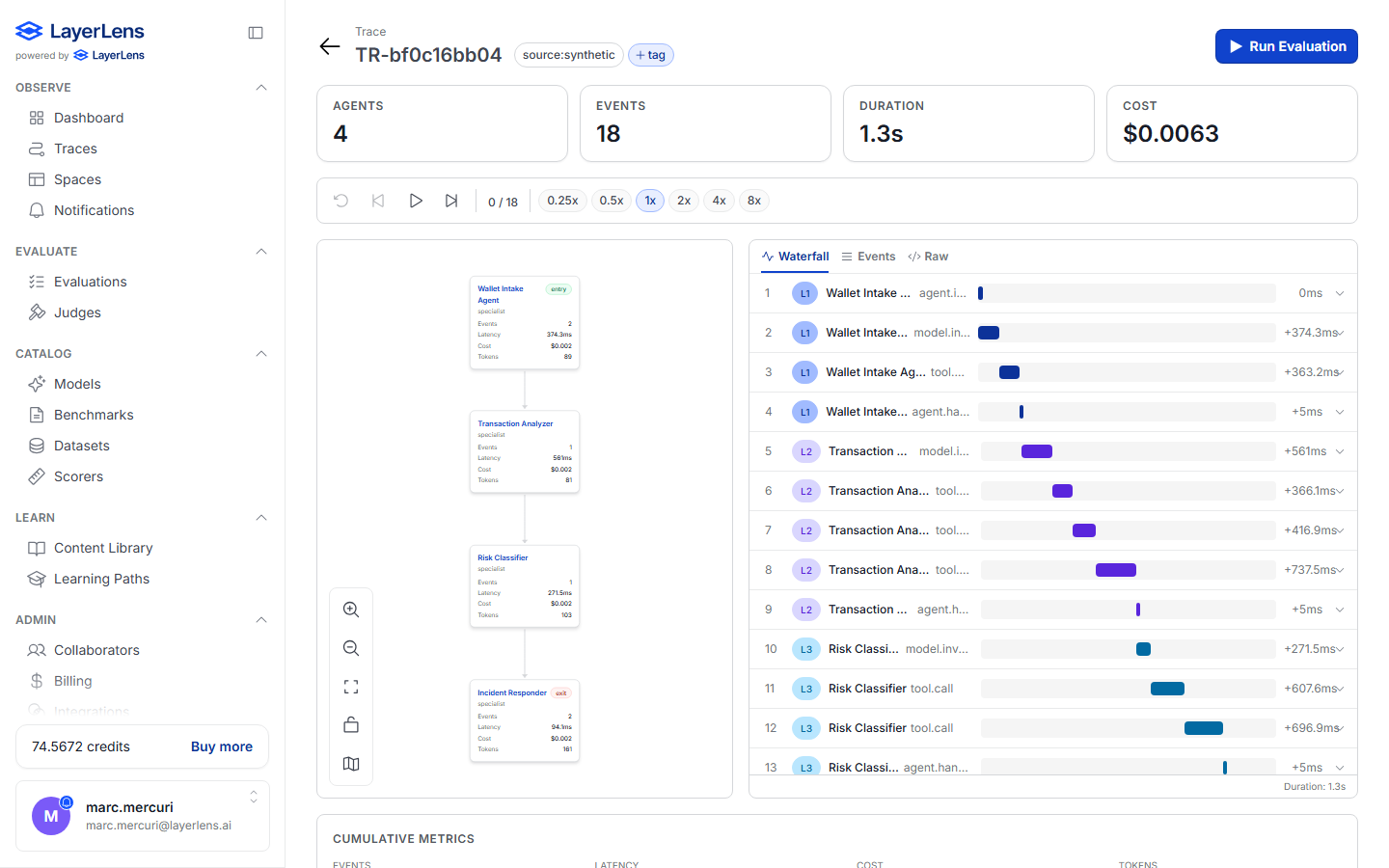
Generated traces are full, structured **multi-agent traces** — not flat text. They render in the trace inspector as an agent graph (distinct agents, hand-offs, tool calls) with a per-event waterfall, exactly like ingested production traces, and are immediately usable in evaluations.

<figure><img src="/files/eU9j0nhk6Y3b37lzFc49" alt="A generated synthetic trace rendered as a multi-node agent graph with a waterfall timeline"><figcaption><p>A generated trace — a real multi-agent graph (4 agents, 18 events) with waterfall timing.</p></figcaption></figure>

## Cost & limits

* Generation consumes **credits**; the cost panel shows the estimate up front.
* A single job is capped at **1,000 credits**; runs above \~100 credits show a soft warning.
* Trace count is capped at **10,000** per run.
* Submitting a generation job requires an **Owner** or **Admin** role in the organization.

## Where to next

* [Datasets](/7.-observe-see-whats-happening/datasets.md) — manage, version, and evaluate the results
* [Trace evaluations](/8.-evaluate-score-the-outputs/trace-evaluations.md) — score a generated dataset
* [Guide: Build a trace set for agentic evals](/more-in-this-section-5/build-trace-set.md)


---

# Agent Instructions
This documentation is published with GitBook. GitBook is the documentation platform designed so that both humans and AI agents can read, navigate, and reason over technical content effectively. Learn more at gitbook.com.

## Querying This Documentation
If you need additional information that is not directly available in this page, you can query the documentation dynamically by asking a question.

Perform an HTTP GET request on the current page URL with the `ask` query parameter, and the optional `goal` query parameter:

```
GET https://docs.layerlens.ai/7.-observe-see-whats-happening/synthetic-data.md?ask=<question>&goal=<endgoal>
```

`ask` is the immediate question: it should be specific, self-contained, and written in natural language.
`goal` is optional and describes the broader end goal you are ultimately trying to accomplish on behalf of the user. GitBook uses it to tailor the answer towards what is most useful for that goal.

The response will contain a direct answer to the question and relevant excerpts and sources from the documentation.

Use this mechanism when the answer is not explicitly present in the current page, you need clarification or additional context, or you want to retrieve related documentation sections.