> For the complete documentation index, see [llms.txt](https://docs.layerlens.ai/llms.txt). Markdown versions of documentation pages are available by appending `.md` to page URLs; this page is available as [Markdown](https://docs.layerlens.ai/7.-observe-see-whats-happening/datasets.md).

# Datasets

{% hint style="info" %}
**Available in Stratix Premium.** This surface is part of the logged-in workspace at [stratix.layerlens.ai](https://stratix.layerlens.ai). Stratix Public users can browse the catalog but cannot use this feature.
{% endhint %}

A **dataset** is a named, versioned collection of traces grouped for streamlined analysis and evaluation. Datasets are the reusable, reproducible input to a trace evaluation: assemble the traces once, then run judges and scorers against the set as many times as you need. Find them under **Catalog → Datasets** in the left rail.

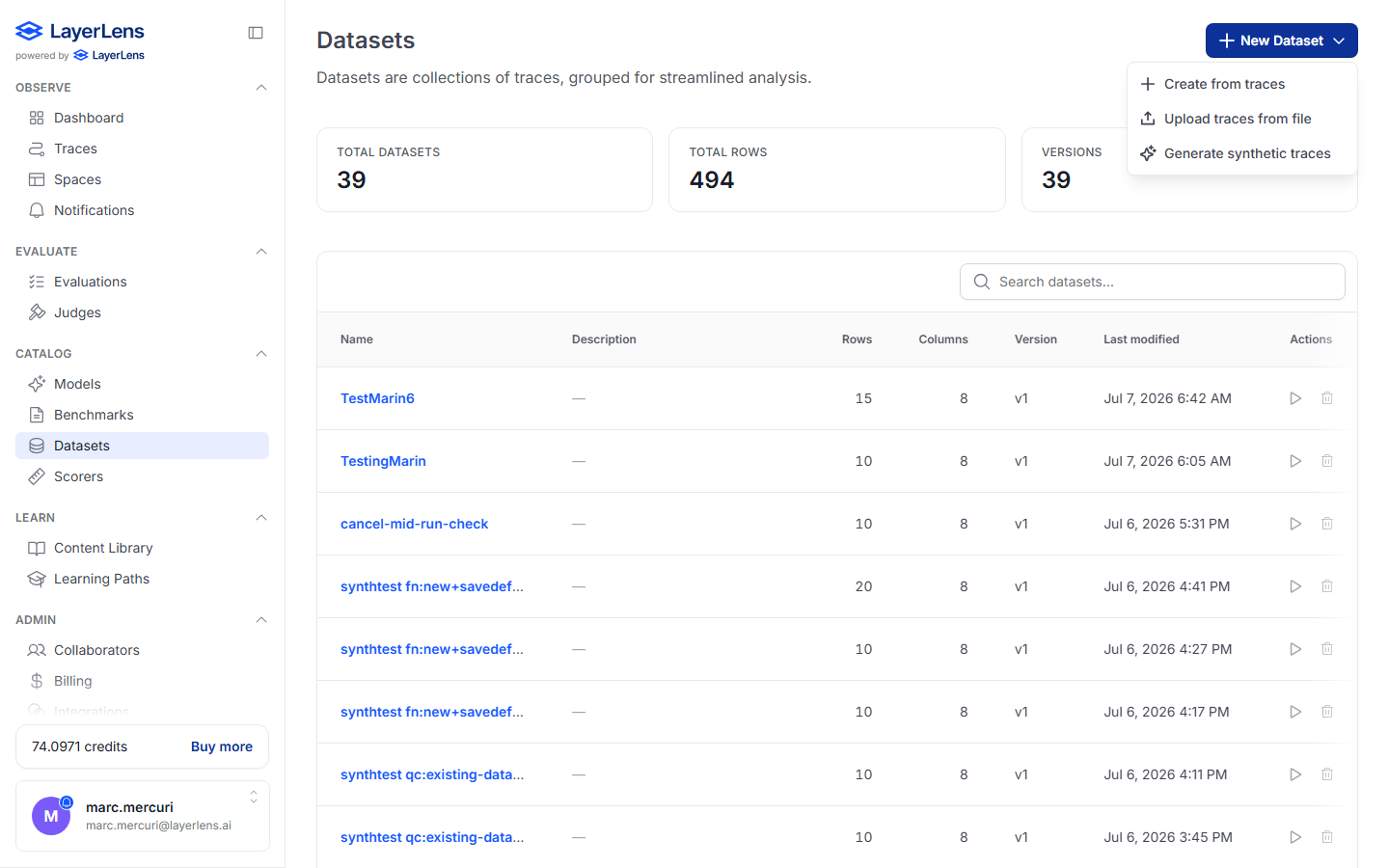
<figure><img src="/files/vsTifcRAxzxAt0qtJNSe" alt="The Datasets surface with the New Dataset menu open, showing Create from traces, Upload traces from file, and Generate synthetic traces"><figcaption><p>The Datasets surface. The <strong>New Dataset</strong> menu offers three ways to build a dataset.</p></figcaption></figure>

## What you can do

* Browse every dataset in your project, with **Total Datasets**, **Total Rows**, and **Versions** stat cards
* Search datasets by name
* See each dataset's row count, column count, current version, and last-modified time
* Open a dataset to preview its rows, inspect its schema, and review version history
* **Run an evaluation** directly against a dataset
* Delete a dataset (the traces it references are not deleted)

## Creating a dataset

Click **New Dataset** for three paths:

| Option                        | Use it when                                                                                                                                                                     |
| ----------------------------- | ------------------------------------------------------------------------------------------------------------------------------------------------------------------------------- |
| **Create from traces**        | You already have traces in the project — pick a filtered set and save it as a dataset.                                                                                          |
| **Upload traces from file**   | You have traces in a file (single trace or batch) to bring in and group.                                                                                                        |
| **Generate synthetic traces** | You want to *create* new trace data — from existing data, an industry scenario, or a saved definition. See [Synthetic data](/7.-observe-see-whats-happening/synthetic-data.md). |

{% hint style="success" %}
No traces yet? **Generate synthetic traces** builds a full, realistic multi-agent dataset from a built-in industry scenario in minutes — no instrumentation required. See [Synthetic data](/7.-observe-see-whats-happening/synthetic-data.md).
{% endhint %}

## Inspecting a dataset

Opening a dataset shows three tabs:

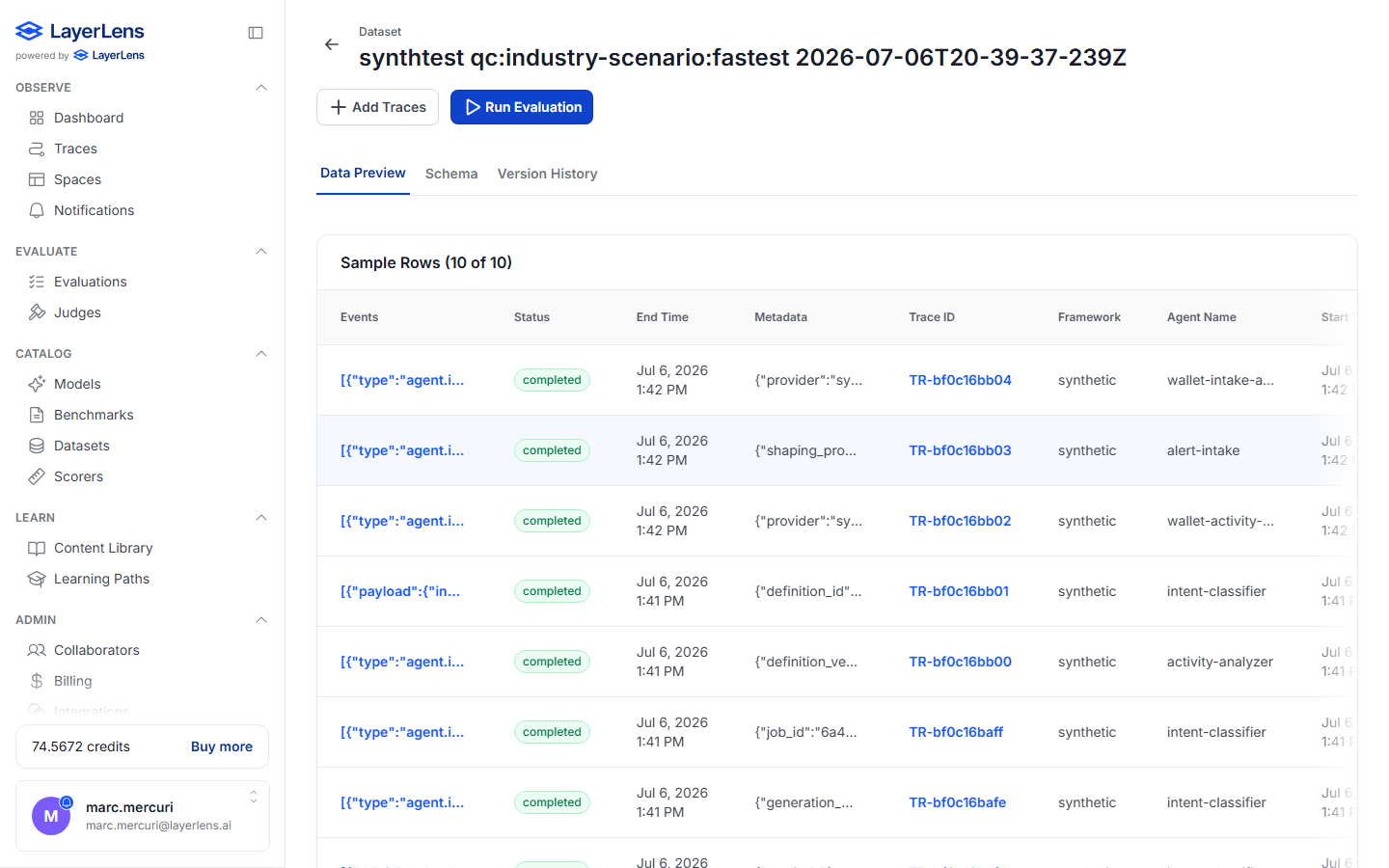
* **Data Preview** — a sample of the dataset's rows: each trace's events, status, end time, metadata, trace ID, framework, and agent name.
* **Schema** — the columns and types the dataset conforms to (used when appending: an appended trace's schema must match).
* **Version History** — every version of the dataset and when it was created.

<figure><img src="/files/lbQmZ8xCIBEzpFXg2HIs" alt="A dataset detail page showing sample rows with status, trace IDs, framework, and agent names"><figcaption><p>A generated dataset — Data Preview shows each trace's status, trace ID, framework, and agent name.</p></figcaption></figure>

From a dataset you can **Add Traces** (append more, deduped by trace id) or **Run Evaluation** to score every trace in the set.

## Versioning

Datasets are versioned. Each version pins an explicit list of trace ids and a row count; the **current version** is what evaluations and the preview read. Today, adding traces dedupes the new trace ids into the current version in place (so you never get duplicate rows, and the row count reflects the deduped set). Full multi-version snapshots — where an append creates a new immutable version so an evaluation you ran against `v1` stays reproducible after the append — are scaffolded in the model and on the near-term roadmap.

## Provenance

Synthetically generated datasets are tagged with their origin (`provenance_kind = synthetic`) and the generation run that produced them (`provenance_run_id`), so you can always trace a dataset back to the job and configuration that created it.

## Where to next

* [Synthetic data](/7.-observe-see-whats-happening/synthetic-data.md) — generate trace datasets from scratch
* [Traces](/7.-observe-see-whats-happening/traces.md) — the individual records datasets are built from
* [Trace evaluations](/8.-evaluate-score-the-outputs/trace-evaluations.md) — score a dataset
* [Guide: Build a trace set for agentic evals](/more-in-this-section-5/build-trace-set.md)


---

# Agent Instructions
This documentation is published with GitBook. GitBook is the documentation platform designed so that both humans and AI agents can read, navigate, and reason over technical content effectively. Learn more at gitbook.com.

## Querying This Documentation
If you need additional information that is not directly available in this page, you can query the documentation dynamically by asking a question.

Perform an HTTP GET request on the current page URL with the `ask` query parameter, and the optional `goal` query parameter:

```
GET https://docs.layerlens.ai/7.-observe-see-whats-happening/datasets.md?ask=<question>&goal=<endgoal>
```

`ask` is the immediate question: it should be specific, self-contained, and written in natural language.
`goal` is optional and describes the broader end goal you are ultimately trying to accomplish on behalf of the user. GitBook uses it to tailor the answer towards what is most useful for that goal.

The response will contain a direct answer to the question and relevant excerpts and sources from the documentation.

Use this mechanism when the answer is not explicitly present in the current page, you need clarification or additional context, or you want to retrieve related documentation sections.